Parallel Stages
AGILAB parallelization should start from a small contract, not from cluster orchestration details.
Use this mental model:
function + split rule + reducer = parallel AGILAB stage
That contract answers the three questions that matter before scaling code:
What function should run once per partition?
How should the work be split?
How should partition outputs be merged back into one result?
Start with the contract locally. Move to distributed workers only after one partition and the reducer are clear.
Choose a split rule
AGILAB uses three first-class split shapes:
Split rule |
Use it for |
User provides |
|---|---|---|
|
Many CSV files, images, reports, logs, or scenario files. |
An input glob or manifest plus a function that processes one file. |
|
One large table that can be chunked by rows, groups, dates, or keys. |
A table path plus the partitioning rule expected by the stage. |
|
Experiments, model settings, scenarios, or optimization grids. |
A parameter-grid file plus a function that runs one parameter set. |
Create a contract
From the AGILAB source checkout, create a parallel_stage.toml contract:
./dev parallel-stage \
  --name process_csv_files \
  --function my_pipeline.process:process_file \
  --split files \
  --input "data/*.csv" \
  --workers-auto \
  --partition-strategy file-chunks \
  --target-partitions 64 \
  --reducer concat-jsonl \
  --backend local \
  --output parallel_stage.toml
The generated file records the intended stage shape:
schema = "agilab.parallel_stage.v1"
name = "process_csv_files"
function = "my_pipeline.process:process_file"
split = "files"
input = "data/*.csv"
workers = "auto"
partition_strategy = "file-chunks"
target_partitions = 64
min_partitions_per_worker = 2
reducer = "concat-jsonl"
backend = "local"
output = "parallel_stage.toml"
This is intentionally not a hidden cluster setting. It is a reviewable artifact that can be committed beside an app, exported from a notebook migration, or referenced by a WORKFLOW stage.
Check a contract
Validate the file before wiring it into an app or distributed run:
./dev parallel-stage --check parallel_stage.toml
For automation:
./dev parallel-stage --check parallel_stage.toml --json
The checker fails when required fields are missing, when the function is not in
module_or_path:function_name form, when the split rule is unknown, or when
the worker/reducer/backend values are invalid.
What actually happens at runtime
parallel_stage.toml is a contract. By itself it does not launch workers,
start a scheduler, or execute partitions. Runtime parallelism appears only when
an app, WORKFLOW stage, or runner consumes the contract and dispatches the
partitions.
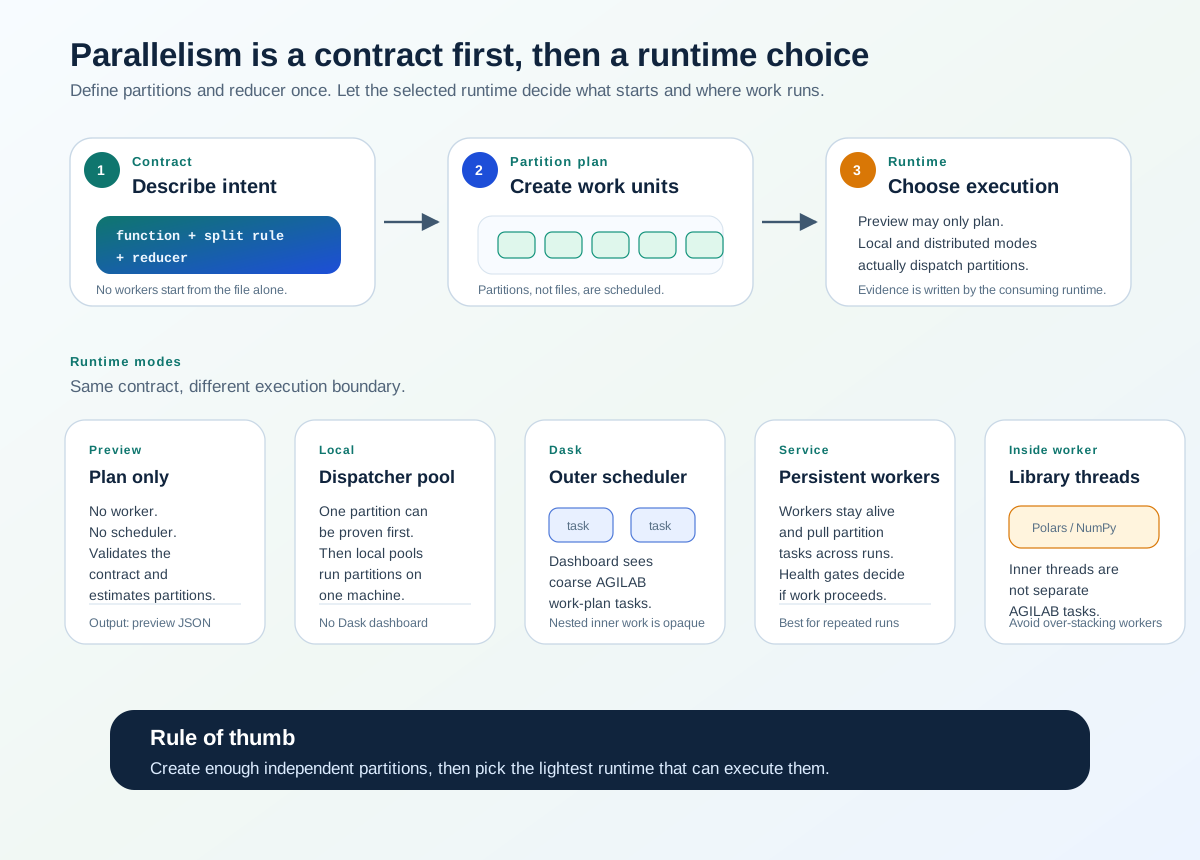
parallel_stage.toml records partition intent; the selected runtime
decides what actually starts and where partitions run.
Mode |
What starts |
What runs in parallel |
What to expect |
|---|---|---|---|
Contract / preview |
No workers and no scheduler. |
Nothing executes; AGILAB validates and plans partitions. |
Use this to check the function, split rule, reducer, and worker policy before scaling. |
Local single-run |
One Python process. |
No AGILAB worker fan-out. |
Use this as the first proof that one partition produces the expected output and evidence. |
Local parallel, Dask disabled |
|
Work-plan partitions can run concurrently on the same machine. |
There is no Dask dashboard. Useful parallelism is bounded by available partitions and useful workers. |
Dask / distributed |
AGILAB starts or connects to the outer scheduler and configured worker slots. |
AGILAB work-plan tasks run across those slots. |
The Dask dashboard sees coarse AGILAB tasks. Hidden nested work inside a single worker remains opaque to the outer scheduler. |
Service mode |
Persistent workers stay alive and pull work. |
The same partition/task model runs through long-lived workers. |
Use this for repeated runs and health-gated workers, not for changing the partition contract. |
Library-internal parallelism |
Libraries such as Polars, NumPy, Cython, or OpenMP may use threads inside one worker. |
AGILAB does not see those inner threads as separate work-plan tasks. |
Avoid stacking too many outer workers on top of kernels that already own their internal parallelism. |
The contract records intent; the consuming runtime decides how that intent is executed. A good review therefore checks both the contract shape and the runtime mode that will consume it.
Try the packaged example
The read-only packaged example shows the low-file-count case directly:
uv --preview-features extra-build-dependencies run python src/agilab/examples/parallel_stage/preview_parallel_stage.py
It reads src/agilab/examples/parallel_stage/parallel_stage.toml and writes
~/log/execute/parallel_stage/parallel_stage_preview.json. The preview
compares two policies on three files and eight available cores:
splittable large files keep eight useful workers by creating chunk partitions.
unsplittable small files cap useful workers to three.
The important part of the preview is small enough to scan in a terminal:
input_files: 3
available_cores: 8
splittable_large_files:
  effective_workers: 8
  planned_partitions: 64
unsplittable_small_files:
  effective_workers: 3
  planned_partitions: 3
That is the core rule: parallelize partitions, not raw file count.
Recommended sequence
Use this order when turning sequential code into an AGILAB parallel stage:
Extract the body into a function that handles one file, one table partition, or one parameter set.
Write or generate
parallel_stage.tomlas a reviewable planning artifact.Run one partition locally and inspect the artifact path and return value.
Add or verify the reducer contract.
Only then switch the backend to
poolordask.Use Distributed Workers when remote workers, scheduler settings, SSH, or shared cluster paths are required.
When files are fewer than cores
Do not treat file count as the final parallelism limit unless each file is unsplittable. Treat partitions as the scheduling unit.
Use this rule:
if file_count >= workers:
    one file can be one partition
elif files_are_splittable:
    split files into chunks until target_partitions is reached
else:
    cap useful workers to file_count
For example, three large CSV files on a 32-core machine should not launch only
three useful tasks. Use partition_strategy = "file-chunks" and set a target
partition count such as 64 or 128 so workers receive row ranges or byte ranges
instead of whole files.
For three small unsplittable binary files, cap the effective worker count to three. More workers add scheduling overhead without increasing throughput.
For mixed file sizes, over-partition the large files first. A practical target is two to four partitions per worker, then let the reducer merge the partition outputs.
Reducers
Pick the smallest reducer that describes the merge behavior:
Reducer |
Meaning |
|---|---|
|
Keep each partition result as a JSON-compatible item and collect them in a list. |
|
Append partition JSON lines into one JSONL artifact. |
|
Concatenate partition CSV outputs with a compatible schema. |
|
The app owns the merge step. Describe the merge contract in |
Current boundary
parallel_stage.toml is the first-class planning and validation artifact for
parallelization. It does not by itself start remote workers. Use it to make the
partition/reducer contract explicit, then connect it to an AGILAB app,
WORKFLOW stage, or generated ORCHESTRATE snippet.
For cluster execution, continue with Distributed Workers.