Distributed Workers
AGILAB supports distributed execution across remote worker machines, but the usual workflow is UI-driven rather than handwritten.
Important
You usually do not write AGI.install(...) or AGI.run(...) by hand.
Configure the cluster in ORCHESTRATE, let AGILAB generate the snippet,
then import or regenerate that generated stage in WORKFLOW.
For most users, the recommended sequence is:
Configure scheduler, workers, and execution flags in ORCHESTRATE.
Let ORCHESTRATE generate the
AGI.install(...),AGI.get_distrib(...), orAGI.run(...)snippet for the current setup.Reuse that generated snippet in WORKFLOW when you want the distributed run to become a reproducible WORKFLOW stage.
You normally do not start by writing cluster orchestration code from scratch.
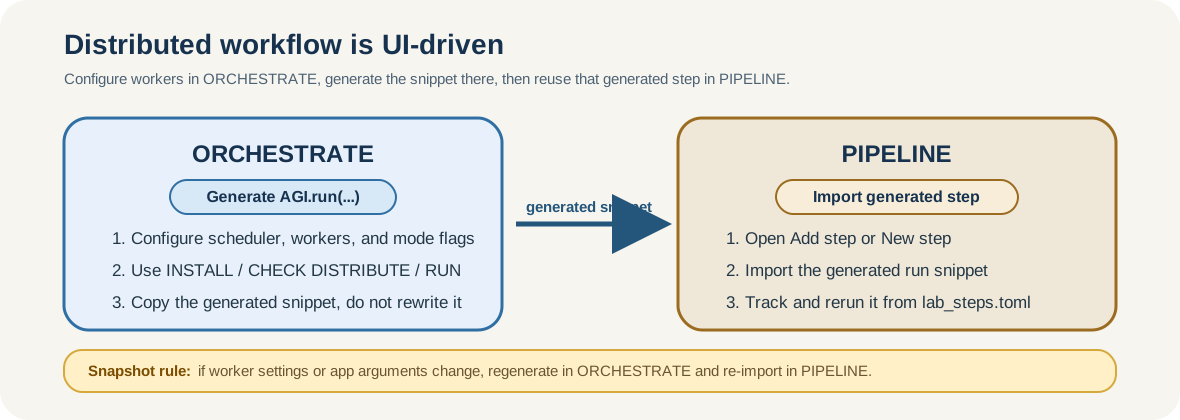
The supported workflow is configure in ORCHESTRATE, generate the snippet there, then reuse that generated stage in WORKFLOW.
Prerequisites
Before configuring distributed workers, make sure the environment is ready:
The machine running AGILAB can reach every worker over the network.
SSH access works non-interactively from the manager to every worker.
Use the real login user for each worker. Do not assume
agiunless that host really exposes anagiaccount. Prefer explicituser@hostnotation whenever the username is not obvious.A shared writable cluster path is visible on every node. The scheduler-side root is
AGI_CLUSTER_SHARE; remote workers can see the same backing storage through an SSHFS mount at Workflow share root. In cluster mode, do not rely onAGI_LOCAL_SHAREas a fallback.For remote workers, Workflow share root is the worker-visible mount target, not a request to rewrite the scheduler-side
AGI_CLUSTER_SHARE. If the scheduler already pointsAGI_CLUSTER_SHAREat an absolute share root, AGILAB keeps that root and passes the worker-side path separately.The shared-path rule above applies to remote workers. For a local-only Dask cluster, where workers are
127.0.0.1orlocalhost, the scheduler and workers share the same local filesystem.AGI_CLUSTER_SHAREmay therefore be a normal local path, including APFS on macOS, and Workflow share root does not need to point to an SSHFS mount.In multi-user environments, each operator uses a separate cluster-share root. Do not let several users write into the same
AGI_CLUSTER_SHAREtree.uvand the required Python runtime are available on the manager and the remote workers.Worker installation uses non-interactive SSH. AGILAB prepends
$HOME/.local/binto remote commands, so user-localuvinstalls are valid as long as$HOME/.local/bin/uvexists on each worker.A Windows machine can be used as the AGILAB UI/manager when the OpenSSH client is available; LAN discovery reads Windows
ipconfig/ ARP output as a convenience. Remote cluster workers are still expected to expose a POSIX shell environment such as Linux or macOS. Native Windows workers are a separate support target because worker probing, SSHFS setup, and generated install/run commands currently assume POSIX tools.Dask is a cluster runtime dependency. When Dask mode is enabled, AGILAB adds
dask[distributed]to the generated worker environment before starting the remotedask workerprocess. Do not duplicate it in an app worker manifest unless the app code imports Dask directly.The target app can be installed cleanly before you scale it to more nodes.
Use Key Generation, Environment Variables, and Troubleshooting if any of those assumptions are not already true.
Stage 1: Configure Distributed Execution in ORCHESTRATE
Open ORCHESTRATE and use System settings as the source of truth for cluster execution.
Typical distributed settings include:
enabling the Dask / cluster execution path
choosing the scheduler host
defining the worker host map (for example
{"192.168.1.21": 1, "192.168.1.22": 1})enabling or disabling
pool,cython, andrapidsaccording to the worker capabilities
When cluster mode is enabled from ORCHESTRATE, AGILAB first tries to populate the scheduler and worker fields from LAN discovery. Treat that as a convenience bootstrap: inspect the discovered values, keep only hosts that pass your SSH and share checks, and override the fields manually when discovery misses a node or finds a host you do not want to use.
These values are persisted in the per-user workspace copy of
app_settings.toml, so future snippet generations stay aligned with the same
cluster definition.
The share directory should follow the same isolation rule: one user, one share
root. Keep worker installation files, datasets, and cluster-visible outputs in
a per-user cluster-share path instead of a common writable directory shared by
multiple operators. Generated snippets remain under the local AGI_LOG_DIR
workspace.
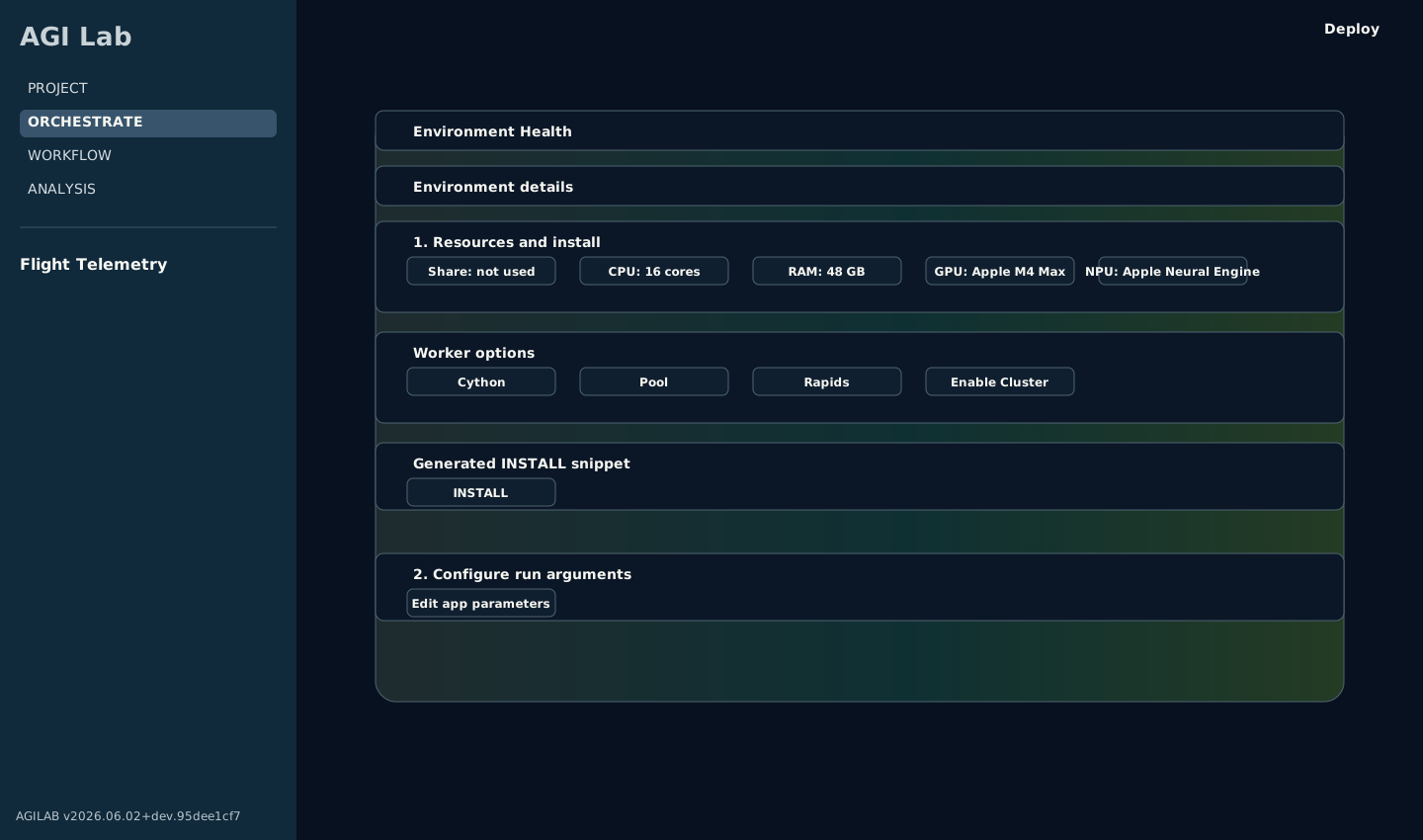
The ORCHESTRATE workspace retains Python-backed worker settings and generated deployment, distribution, and execution snippets under the shared React header.
Stage 2: Let ORCHESTRATE Generate the Snippet
Once the distributed settings are configured, ORCHESTRATE generates the deployment and execution code for you.
Use the generated sections in this order:
Install to generate and run the
AGI.install(...)snippet that stages the worker runtime on the selected nodesDistribute to generate
AGI.get_distrib(...)and inspect how the work plan is partitioned before running itRun to generate the final
AGI.run(...)snippet for the configured distributed setupNotebook to download the generated orchestration recipe as a runnable
.ipynbhandoff artifact when you want to review or share the current install/distribute/run setup outside the UI
Treat these snippets as generated operational artifacts, not as examples you must manually reconstruct first.
Reading mode and modes_enabled
The generated install and run snippets usually contain one of these fields:
Field |
Typical snippet |
Meaning |
|---|---|---|
|
|
Bitmask of the execution capabilities that should be staged during install. |
|
|
One concrete execution mode selected for the current run. |
Both use the same bit values derived from the ORCHESTRATE toggles:
Toggle |
Bit value |
Meaning |
|---|---|---|
|
|
Worker-pool execution path; backend may be process- or thread-based. |
|
|
Compiled worker path when a Cython build exists. |
|
|
Distributed Dask scheduler / remote worker execution. |
|
|
RAPIDS / GPU execution path when supported by the target workers. |
So a value such as 13 means 4 + 8 + 1:
distributed cluster execution, with rapids and pool enabled. A value
of 15 means all four flags are enabled.
You normally do not enter these integers yourself. ORCHESTRATE computes them from the current cluster toggles and inserts the decoded value into the generated snippet.
Quick UI Walkthrough
Use this short checklist the first time:
In ORCHESTRATE, open System settings and enter the scheduler host and worker map.
Use Deploy scheduler & workers to stage the worker runtime on the selected machines.
Use CHECK DISTRIBUTE to inspect the generated
AGI.get_distrib(...)plan and confirm the partitions land on the intended workers.Use RUN to generate the current
AGI.run(...)snippet for that setup.In WORKFLOW, open Add stage or New stage, then import or regenerate that generated run stage instead of rewriting it manually.
Equivalent Generated Snippets
If you want the simplest mental model first, start with a local-only run:
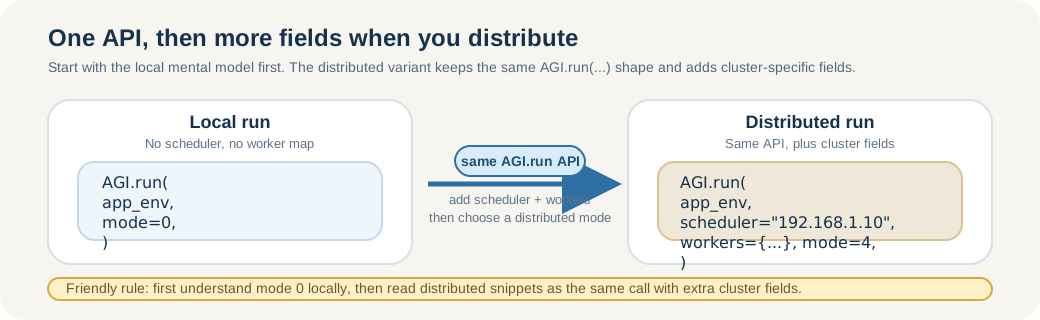
Read distributed snippets as the same AGI.run(...) call with a few extra cluster fields.
import asyncio

from agi_cluster.agi_distributor import AGI, RunRequest
from agi_env import AgiEnv

async def main():
    app_env = AgiEnv(app="minimal_app_project", verbose=1)
    request = RunRequest(mode=AGI.PYTHON_MODE)
    result = await AGI.run(app_env, request=request)
    print(result)

asyncio.run(main())
That is the same API, but without scheduler, workers, or distributed flags.
Once that mental model is clear, the distributed variant is the same call with the cluster fields filled in:
ORCHESTRATE emits a snippet equivalent to the current UI configuration. A
distributed AGI.run(...) snippet typically looks like this:
import asyncio

from agi_cluster.agi_distributor import AGI, RunRequest
from agi_env import AgiEnv

async def main():
    app_env = AgiEnv(app="minimal_app_project", verbose=1)
    workers = {
        "192.168.1.21": 1,  # one worker slot on host 1
        "192.168.1.22": 1,  # one worker slot on host 2
    }
    request = RunRequest(
        scheduler="192.168.1.10",
        workers=workers,
        mode=AGI.DASK_MODE,
    )
    result = await AGI.run(app_env, request=request)
    print(result)

asyncio.run(main())
In normal usage, you get this from ORCHESTRATE after setting the scheduler and worker hosts in the UI.
Stage 3: Validate the Distribution Before Running
Before launching a large distributed run, use CHECK DISTRIBUTE in ORCHESTRATE.
This gives you:
the generated
AGI.get_distrib(...)snippeta Distribution tree view of the current work plan
the Workplan editor so you can reassign partitions to different workers
This stage is the fastest way to catch obvious mismatches such as:
too many partitions for the selected workers
all partitions being assigned to one host
cluster settings changed in the UI but an old run snippet still being reused
Stage 4: Reuse the Generated Snippet in WORKFLOW
When the distributed run should become part of a repeatable workflow, move to WORKFLOW.
The normal reuse path is:
Generate the install / distribute / run snippet in ORCHESTRATE.
On WORKFLOW, open Add stage (or New stage on a fresh lab).
Import the generated snippet as the stage source, or regenerate it from the latest current settings.
Run the imported stage from WORKFLOW so the distributed orchestration becomes part of
lab_stages.tomland the tracked experiment history.
Important: imported snippets are snapshots. If you change worker hosts, execution flags, or app arguments in ORCHESTRATE, regenerate or re-import the snippet before running it again in WORKFLOW.
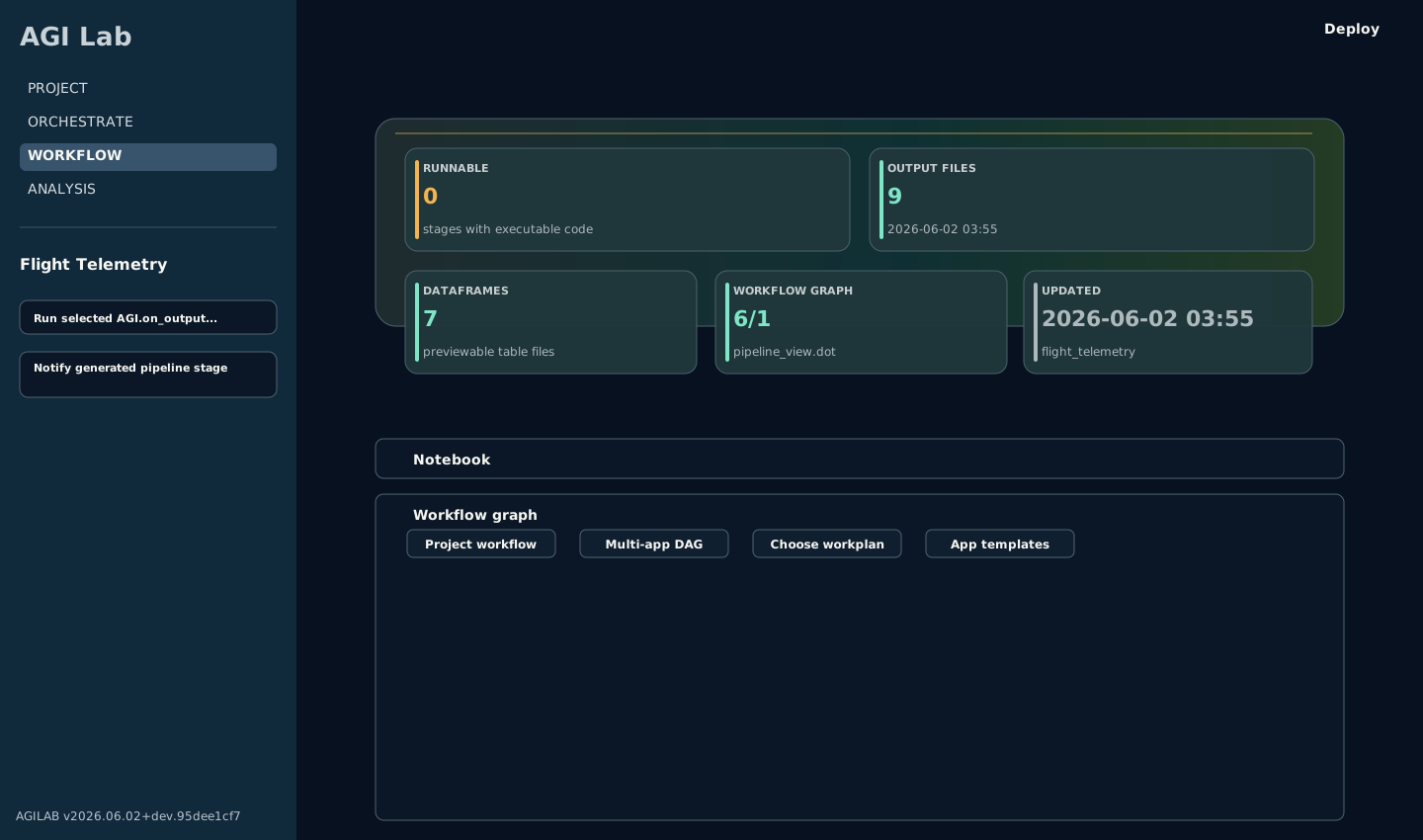
WORKFLOW is where the generated distributed snippet becomes a tracked, reusable stage in lab_stages.toml.
Best Practices
Use these habits to keep distributed runs predictable:
Start with one local scheduler and one remote worker before scaling to many nodes.
Treat
AGI_CLUSTER_SHAREas the scheduler-side source path and Workflow share root as the worker-side SSHFS mount target. These paths may differ on mixed operating systems, for example a macOS scheduler path mounted under a Linux worker home directory, but they must expose the same backing storage after SSHFS is mounted. Do not use Workflow share root to replace a preconfigured scheduler share root.Keep local-only and remote-worker clusters distinct. Local-only clusters can use a local
AGI_CLUSTER_SHAREpath directly; remote-worker clusters need a worker-visible shared mount target in Workflow share root.Keep worker SSHFS prerequisites explicit:
sshfsmust be installed, the worker must be able to SSH back to the scheduler, and the scheduler host key should already be present in the workerknown_hostsfile. AGILAB uses reconnect/keepalive options and strict host-key checking rather than silently accepting new scheduler keys.Keep cluster share and local share conceptually separate. In cluster mode, outputs should land on the shared cluster path, not silently on local-only storage.
Re-run Deploy scheduler & workers after dependency changes, worker-environment changes, or app updates that affect imports.
Use CHECK DISTRIBUTE before expensive runs so the partitioning matches the intended worker layout.
Size worker counts to the actual workload. More workers do not automatically mean better performance if the work plan is small or heavily serialized.
Keep generated snippets in sync with the current UI state. Do not assume an older exported script still matches the latest app configuration.
Troubleshooting
Common distributed setup failures usually fall into one of these categories:
Deploy scheduler & workers hangs or never starts remotely: verify SSH reachability, keys, and host trust.
Workers do not join the scheduler: verify the scheduler host is reachable from the workers and that the worker host definitions are correct.
Outputs go to the wrong place: verify cluster mode is enabled, the scheduler
AGI_CLUSTER_SHAREis mounted on each remote worker with SSHFS, and Workflow share root matches the worker-visible mount target.Remote import errors after a successful install: verify the worker environment was rebuilt from the current app and that dependencies are declared in the correct
pyproject.tomlscope.Remote Dask worker never attaches and logs mention ``Failed to spawn: dask``: re-run Deploy scheduler & workers with the current AGILAB version so the generated worker environment is recreated and receives
dask[distributed]. This is part of AGILAB cluster deployment, not a dependency every app should carry.WORKFLOW runs stale cluster code: regenerate or re-import the snippet from ORCHESTRATE after changing worker or app settings.
See also: