Execution Playground
The built-in execution playground is the quickest way to show what AGILAB adds on top of a plain dataframe benchmark.
Instead of only comparing libraries, AGILAB compares execution models on the same workload and keeps the whole orchestration path visible.
What is included
Two built-in projects ship the same synthetic workload:
execution_pandas_projectexecution_polars_project
They both read the same generated CSV dataset under
execution_playground/dataset and produce grouped benchmark outputs.
The difference is the worker path:
ExecutionPandasWorkerextendsPandasWorkerExecutionPolarsWorkerextendsPolarsWorker
That lets AGILAB expose not only timing differences, but also the execution style behind them.
Where you see it in the UI
The two apps are run through the normal AGILAB pages. The benchmark value comes from the fact that the same UI flow can drive two different worker families without changing the orchestration path.
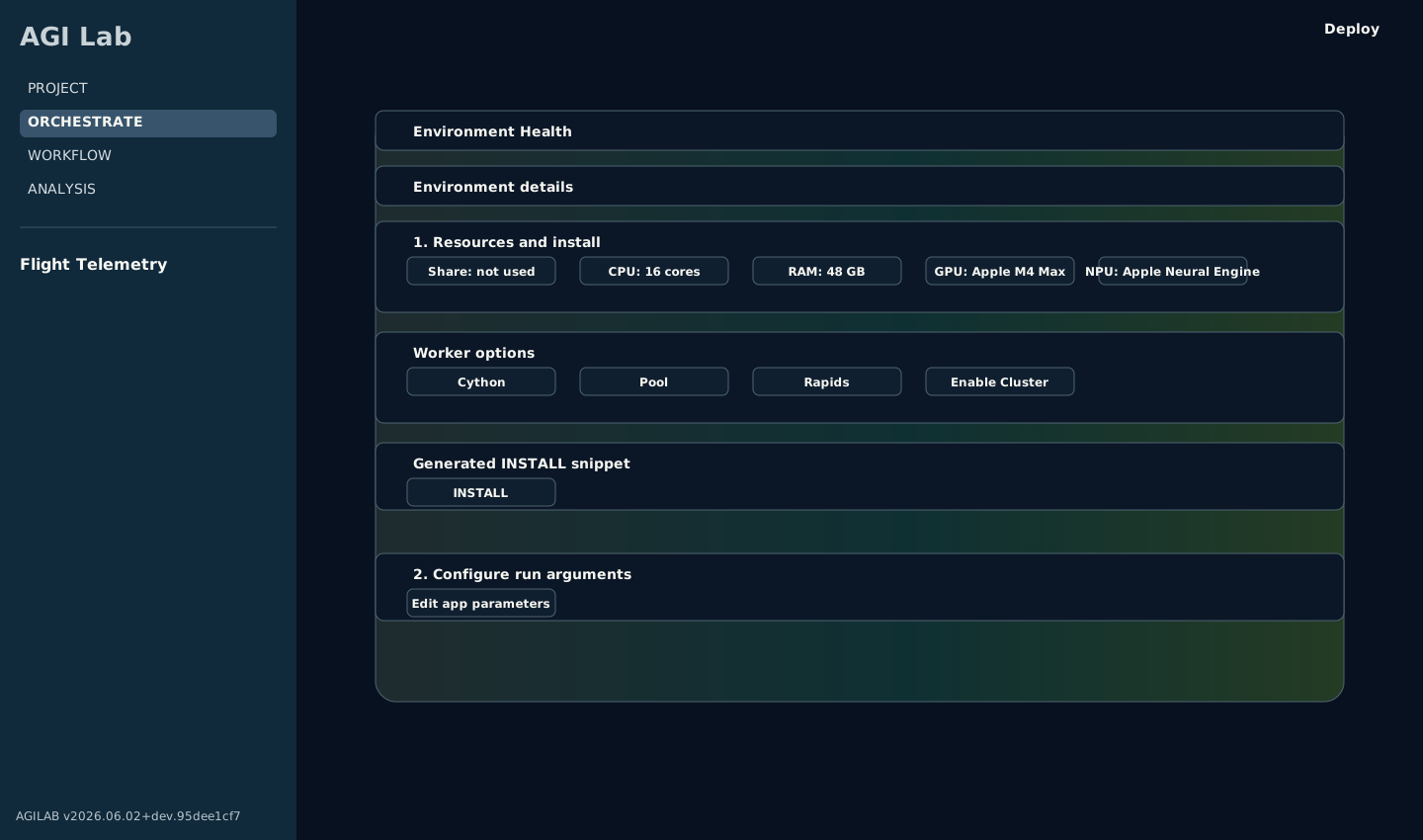
The benchmark setup uses the normal PROJECT -> ORCHESTRATE workspace flow; select the project in the shared React header before configuring execution.
Why this example matters
Many benchmark demos stop at:
pandas vs polars
local vs distributed
Python vs compiled
AGILAB goes one step further:
same workload
same orchestration flow
same benchmark UI
different worker/runtime path
This makes it easier to answer the practical question:
Did performance improve because of the library, or because of the execution model?
What the benchmark shows
For this example, the public message is intentionally simple:
PandasWorkerhighlights a process-oriented worker pathPolarsWorkerhighlights an in-process threaded worker path
The pool flag is AGILAB’s external local fan-out. It does not mean the same
runtime shape for every dataframe library:
App |
AGILAB pool implementation |
Performance reading |
|---|---|---|
|
process-backed worker pool |
Pandas can benefit when independent file partitions are spread across worker processes, especially for Python-bound or mixed Python/native sections. |
|
thread pool around Polars calls |
Polars already manages native parallelism inside the library. Adding an external AGILAB pool can compete with that internal pool and may add scheduling or memory-bandwidth overhead instead of improving throughput. |
The benchmark results in ORCHESTRATE then let you compare timings while the rest of AGILAB still shows:
install state
distribution plan
generated snippets
exported outputs
Measured local benchmark
The repository ships a reproducible benchmark helper:
uv --preview-features extra-build-dependencies run python tools/benchmark_execution_playground.py --repeats 3 --warmups 1 --worker-counts 1,2,4,8 --rows-per-file 100000 --compute-passes 32 --n-partitions 16
The helper now resolves its built-in app paths from the script location, so it can be launched from any working directory inside or outside the repo root.
Median results from a local run on macOS / Python 3.13.9 with 16 partitions,
100000 rows per file, and 32 compute passes:
These numbers are intentionally useful because the heavier mixed workload separates “more workers” from “better fit”:
the pandas process-oriented path is only slightly ahead in local
parallelmode at1worker (1.772s), then gets worse as worker count rises (2.157sat8workers)the polars threaded path improves at
1-2workers (1.520s,1.436s) and then converges back toward its steady state (1.564sat8workers)AGILAB therefore shows both execution model and worker-count scaling on the same reproducible workload, including the point where an external pool no longer helps because the library already owns the inner parallelism
Raw benchmark artifacts are versioned under:
docs/source/data/execution_playground_benchmark.json
Typed Cython kernel proof
execution_pandas_project is the reference worker app for an explicit
Cython/C-speedup path. It uses kernel_mode = "typed_numeric" by default,
enables Cython in its app settings, converts the scoring columns to contiguous
float64 arrays, and runs the repeated score/checksum loop through a
Cython-compatible typed function.
That distinction matters: wrapping Pandas calls in Cython is not a useful proof of Cython acceleration, because Pandas is already executing compiled kernels. The typed kernel keeps the surrounding app realistic while giving Cython a numeric loop where fixed dtypes can remove Python object dispatch.
The worker manifest declares Cython as a build requirement, so this app is the recommended starting point when you need to show how a normal AGILAB worker can carry a compiled hot path without moving the surrounding dataframe I/O and artifact contract out of Python.
The kernel-only evidence helper compiles the actual worker source in a temporary
Cython extension, then compares the same _typed_numeric_score_kernel through
Python and Cython:
uv --preview-features extra-build-dependencies run python tools/benchmark_execution_pandas_cython_kernel.py --rows 100000 --compute-passes 32 --repeats 3 --warmups 1 --json-out docs/source/data/execution_pandas_typed_kernel_benchmark.json --csv-out docs/source/data/execution_pandas_typed_kernel_benchmark.csv
The --json-out and --csv-out paths above are the committed benchmark
artifacts rendered on this page, so this exact command regenerates them.
To measure the optional type-preprocessor itself, add
--compare-preprocess. That mode compiles the same worker as raw Cython and
as remove_decorators + preprocess_source output, validates both against the
Python implementation, and records typed/skipped counts in the JSON/CSV report.
Latest local evidence on macOS / Python 3.13.13:
runtime |
median_seconds |
min_seconds |
max_seconds |
rows_per_second |
speedup_vs_python |
checksum |
|---|---|---|---|---|---|---|
python |
0.620132 |
0.603714 |
0.620513 |
161256 |
1.00 |
157347.169221 |
cython |
0.002023 |
0.002015 |
0.002073 |
49431537 |
306.54 |
157347.169221 |
Read this as a kernel proof, not an end-to-end runtime promise. Full AGILAB runs
still include CSV reads, dataframe grouping, result writes, worker startup, and
optional Dask/process orchestration. The reducer records kernel_mode,
kernel_runtime, and dtype_contract so the output artifact makes that
distinction explicit.
The real-world companion is flight_telemetry_project: it keeps Polars
ingestion, output writing, pages, and reducer artifacts in Python, but moves the
per-row haversine distance calculation into the same worker-only Cython pattern.
Its reducer summary records speed_kernel_runtime,
speed_dtype_contract, and speed_kernel_checksum_m.
Optional Rust/PyO3 worker preview
AGILAB can also host native Rust code behind a Python worker boundary, but this is deliberately an optional advanced lane rather than a base dependency.
Use the packaged native_rust_worker preview when you want to show the
architecture without requiring every AGILAB install to carry a Rust toolchain:
uv --preview-features extra-build-dependencies run python src/agilab/examples/native_rust_worker/preview_native_rust_worker.py --output-dir /tmp/agilab-rust-worker
The preview writes a small PyO3/maturin project, a Python worker wrapper, a
sample payload, and native_rust_worker_evidence.json. It does not compile
Rust by default. The evidence records the Python reference checksum, generated
file hashes, the build backend, and the intended AGILAB boundary:
orchestration, dataframe I/O, reducers, paths, and evidence stay in Python
only the measured typed hot kernel moves to Rust
the base AGILAB install remains unchanged
Build the generated project only when you actually want to execute the native extension:
cd /tmp/agilab-rust-worker/rust_worker
uv tool install maturin
maturin develop --release
python worker_wrapper.py --payload sample_payload.json --output native_result.json
Read this as a worker-extension contract, not a migration strategy. Cython is still the first AGILAB-native acceleration path for typed Python kernels. Use Rust/PyO3 when ownership, safety, an existing Rust crate, or a long-lived native library justifies the extra wheel and toolchain complexity.
macOS SSH 2-node 16-mode matrix
The repository also ships a second helper for one intentionally narrow evidence
route: the full 16-mode matrix on 2 Macs over SSH. Treat this as
macos-ssh-2node benchmark evidence, not as portable Linux/macOS/Windows
cluster validation:
uv --preview-features extra-build-dependencies run python tools/benchmark_execution_mode_matrix.py --remote-host <remote-macos-ip> --scheduler-host <local-macos-ip> --rows-per-file 100000 --compute-passes 32 --n-partitions 16 --repeats 2
--remote-host accepts either host or user@host. For portable use,
prefer user@host with the real login user of the remote worker. If you pass
only a host or IP, the helper currently defaults to agi@<host> for both the
SSH probe/setup steps and the dataset rsync step, so only rely on the bare
host form when the remote account is actually named agi.
This run uses:
1 local macOS ARM scheduler/worker
1 remote macOS ARM worker over SSH
the same
16partitions,100000rows per file, and32compute passes
For portable cluster readiness, use the AGILAB cluster validation and robustness tools instead of this macOS-specific benchmark helper.
Mode families
The 16 modes split into 4 families:
0-3: local CPU modes4-7: 2-node Dask modes8-11: local modes with the RAPIDS bit requested12-15: 2-node Dask modes with the RAPIDS bit requested
The compact code column uses the order r d c p:
r= RAPIDS requestedd= Dask / cluster topologyc= Cython requestedp= worker pool / local fan-out requested; the backend may be process- or thread-based depending on the worker implementation
In the versioned benchmark artifacts shipped with the repository, the r...
and rd... modes are still CPU-only because neither node exposed NVIDIA
tooling on that capture. The helper still reports RAPIDS requests explicitly,
and on other hardware it can mark local-only RAPIDS rows as GPU-accelerated
even if the remote node stays CPU-only.
How to read the matrix quickly
Ignore rows
8-15for performance interpretation in the versioned capture below: they keep the RAPIDS bit visible, but they are still CPU-only there.Read the matrix by families, not by isolated rows:
local Python/Cython baseline:
0-2local pool/fan-out family:
1-32-node Dask family:
4-7
Compare each family back to mode
0(____) to see whether the execution model is buying you anything.
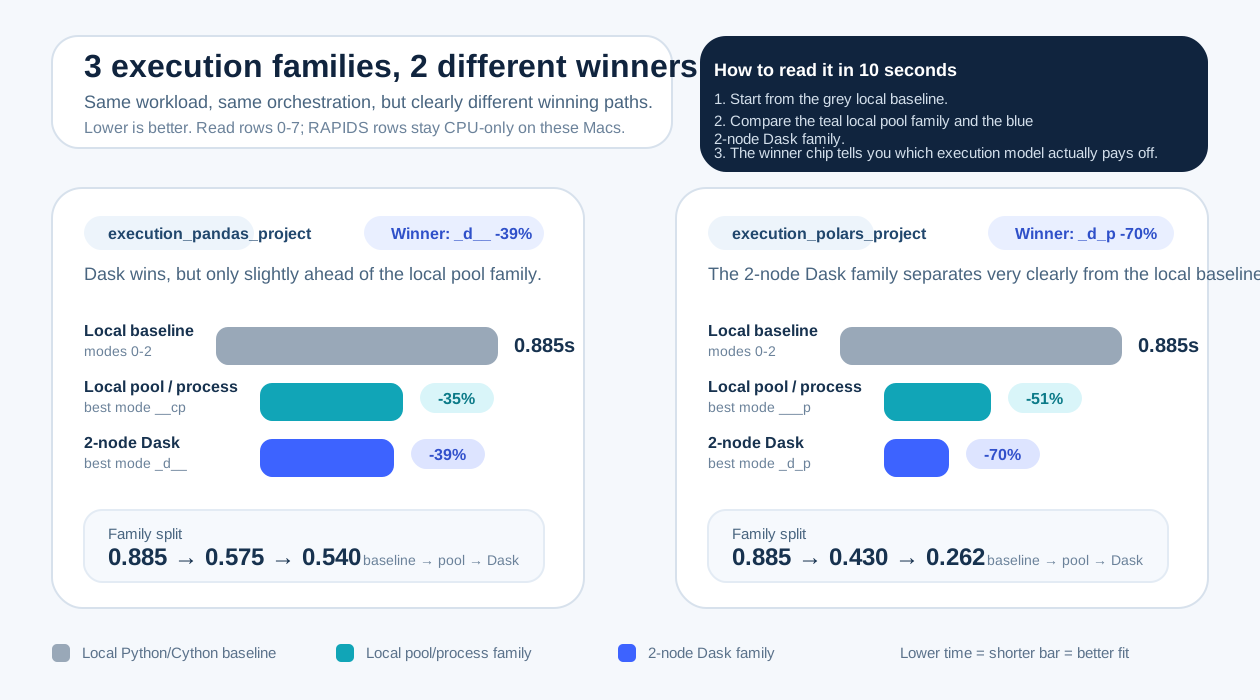
Compact map of the 16 execution modes grouped by topology and runtime family.
ORCHESTRATE table snapshot
The tables below mirror the ORCHESTRATE > Benchmark results expander rather
than a separate screenshot. The UI reads benchmark.json, uses the run-mode
keys as the row index, and displays the columns mode, timing,
nodes, seconds, order, delta, and delta (%). The nodes
column shows how many machines were used by the run; the extra topology
column below keeps the docs readable outside the app.
run_mode |
nodes |
mode |
timing |
seconds |
order |
delta |
delta (%) |
topology |
|---|---|---|---|---|---|---|---|---|
0 |
1 |
python |
0.89 seconds |
0.885 |
14 |
0.345 |
63.89 |
local only |
1 |
1 |
pool of process |
0.58 seconds |
0.585 |
6 |
0.045 |
8.33 |
local only |
2 |
1 |
cython |
0.91 seconds |
0.910 |
16 |
0.370 |
68.52 |
local only |
3 |
1 |
pool and cython |
0.57 seconds |
0.575 |
3 |
0.035 |
6.48 |
local only |
4 |
2 |
dask |
0.54 seconds |
0.540 |
1 |
0.000 |
0.00 |
2-node cluster (1 local + 1 remote macOS worker) |
5 |
2 |
dask and pool |
0.61 seconds |
0.613 |
12 |
0.073 |
13.52 |
2-node cluster (1 local + 1 remote macOS worker) |
6 |
2 |
dask and cython |
0.56 seconds |
0.561 |
2 |
0.021 |
3.89 |
2-node cluster (1 local + 1 remote macOS worker) |
7 |
2 |
dask and pool and cython |
0.58 seconds |
0.583 |
5 |
0.043 |
7.96 |
2-node cluster (1 local + 1 remote macOS worker) |
8 |
1 |
rapids |
0.86 seconds |
0.860 |
13 |
0.320 |
59.26 |
local only |
9 |
1 |
rapids and pool |
0.58 seconds |
0.585 |
7 |
0.045 |
8.33 |
local only |
10 |
1 |
rapids and cython |
0.89 seconds |
0.885 |
15 |
0.345 |
63.89 |
local only |
11 |
1 |
rapids and pool and cython |
0.57 seconds |
0.575 |
4 |
0.035 |
6.48 |
local only |
12 |
2 |
rapids and dask |
0.59 seconds |
0.586 |
8 |
0.046 |
8.52 |
2-node cluster (1 local + 1 remote macOS worker) |
13 |
2 |
rapids and dask and pool |
0.60 seconds |
0.596 |
11 |
0.056 |
10.37 |
2-node cluster (1 local + 1 remote macOS worker) |
14 |
2 |
rapids and dask and cython |
0.59 seconds |
0.589 |
10 |
0.049 |
9.07 |
2-node cluster (1 local + 1 remote macOS worker) |
15 |
2 |
rapids and dask and pool and cython |
0.59 seconds |
0.588 |
9 |
0.048 |
8.89 |
2-node cluster (1 local + 1 remote macOS worker) |
run_mode |
nodes |
mode |
timing |
seconds |
order |
delta |
delta (%) |
topology |
|---|---|---|---|---|---|---|---|---|
0 |
1 |
python |
0.89 seconds |
0.885 |
14 |
0.623 |
237.79 |
local only |
1 |
1 |
pool of process |
0.43 seconds |
0.430 |
9 |
0.168 |
64.12 |
local only |
2 |
1 |
cython |
0.90 seconds |
0.900 |
16 |
0.638 |
243.51 |
local only |
3 |
1 |
pool and cython |
0.45 seconds |
0.445 |
12 |
0.183 |
69.85 |
local only |
4 |
2 |
dask |
0.31 seconds |
0.307 |
5 |
0.045 |
17.18 |
2-node cluster (1 local + 1 remote macOS worker) |
5 |
2 |
dask and pool |
0.26 seconds |
0.262 |
1 |
0.000 |
0.00 |
2-node cluster (1 local + 1 remote macOS worker) |
6 |
2 |
dask and cython |
0.31 seconds |
0.307 |
6 |
0.045 |
17.18 |
2-node cluster (1 local + 1 remote macOS worker) |
7 |
2 |
dask and pool and cython |
0.30 seconds |
0.304 |
2 |
0.042 |
16.03 |
2-node cluster (1 local + 1 remote macOS worker) |
8 |
1 |
rapids |
0.88 seconds |
0.875 |
13 |
0.613 |
233.97 |
local only |
9 |
1 |
rapids and pool |
0.43 seconds |
0.430 |
10 |
0.168 |
64.12 |
local only |
10 |
1 |
rapids and cython |
0.90 seconds |
0.895 |
15 |
0.633 |
241.60 |
local only |
11 |
1 |
rapids and pool and cython |
0.44 seconds |
0.440 |
11 |
0.178 |
67.94 |
local only |
12 |
2 |
rapids and dask |
0.31 seconds |
0.310 |
7 |
0.048 |
18.32 |
2-node cluster (1 local + 1 remote macOS worker) |
13 |
2 |
rapids and dask and pool |
0.30 seconds |
0.305 |
3 |
0.043 |
16.41 |
2-node cluster (1 local + 1 remote macOS worker) |
14 |
2 |
rapids and dask and cython |
0.31 seconds |
0.306 |
4 |
0.044 |
16.79 |
2-node cluster (1 local + 1 remote macOS worker) |
15 |
2 |
rapids and dask and pool and cython |
0.34 seconds |
0.336 |
8 |
0.074 |
28.24 |
2-node cluster (1 local + 1 remote macOS worker) |
execution_pandas_project
Use this app when you want the benchmark to read as a process-oriented baseline.
Worker family:
ExecutionPandasWorkeroverPandasWorkerStory to tell: how far a process-backed worker pool, Cython typed kernel, and Dask path go on the same workload
What to inspect in AGILAB: install/distribution state in ORCHESTRATE, then the benchmark table and exported artifacts for the
_d__familyPractical reading: this app is the easiest way to show that “more workers” does not automatically beat the local path unless the execution model fits
mode |
label |
topology |
median_seconds |
|---|---|---|---|
0 |
python |
local only |
0.885 |
1 |
pool of process |
local only |
0.585 |
2 |
cython |
local only |
0.910 |
3 |
pool and cython |
local only |
0.575 |
4 |
dask |
2-node cluster (1 local + 1 remote macOS worker) |
0.540 |
5 |
dask and pool |
2-node cluster (1 local + 1 remote macOS worker) |
0.613 |
6 |
dask and cython |
2-node cluster (1 local + 1 remote macOS worker) |
0.561 |
7 |
dask and pool and cython |
2-node cluster (1 local + 1 remote macOS worker) |
0.583 |
8 |
rapids |
local only |
0.860 |
9 |
rapids and pool |
local only |
0.585 |
10 |
rapids and cython |
local only |
0.885 |
11 |
rapids and pool and cython |
local only |
0.575 |
12 |
rapids and dask |
2-node cluster (1 local + 1 remote macOS worker) |
0.586 |
13 |
rapids and dask and pool |
2-node cluster (1 local + 1 remote macOS worker) |
0.596 |
14 |
rapids and dask and cython |
2-node cluster (1 local + 1 remote macOS worker) |
0.589 |
15 |
rapids and dask and pool and cython |
2-node cluster (1 local + 1 remote macOS worker) |
0.588 |
execution_polars_project
Use this app when you want the benchmark to read as an in-process threaded path with a different scaling profile.
Worker family:
ExecutionPolarsWorkeroverPolarsWorkerStory to tell: the same workload can prefer a lighter in-process path over a heavier process-oriented topology, because Polars already runs native parallel work inside the library
What to inspect in AGILAB: the same ORCHESTRATE > Benchmark results table, but with attention on the
_d_pfamily and how it differs from the pandas appPractical reading: this app is the clearest proof that AGILAB is benchmarking execution models, not only dataframe libraries
mode |
label |
topology |
median_seconds |
|---|---|---|---|
0 |
python |
local only |
0.885 |
1 |
pool of process |
local only |
0.430 |
2 |
cython |
local only |
0.900 |
3 |
pool and cython |
local only |
0.445 |
4 |
dask |
2-node cluster (1 local + 1 remote macOS worker) |
0.307 |
5 |
dask and pool |
2-node cluster (1 local + 1 remote macOS worker) |
0.262 |
6 |
dask and cython |
2-node cluster (1 local + 1 remote macOS worker) |
0.307 |
7 |
dask and pool and cython |
2-node cluster (1 local + 1 remote macOS worker) |
0.304 |
8 |
rapids |
local only |
0.875 |
9 |
rapids and pool |
local only |
0.430 |
10 |
rapids and cython |
local only |
0.895 |
11 |
rapids and pool and cython |
local only |
0.440 |
12 |
rapids and dask |
2-node cluster (1 local + 1 remote macOS worker) |
0.310 |
13 |
rapids and dask and pool |
2-node cluster (1 local + 1 remote macOS worker) |
0.305 |
14 |
rapids and dask and cython |
2-node cluster (1 local + 1 remote macOS worker) |
0.306 |
15 |
rapids and dask and pool and cython |
2-node cluster (1 local + 1 remote macOS worker) |
0.336 |
What the matrix adds
This second benchmark makes three extra points visible:
the heavier scalar tail now separates the plain local Python/Cython family, the local pool family, and the 2-node Dask family much more clearly
the best mode is not the same for the two worker designs:
_d__forexecution_pandas_projectand_d_pforexecution_polars_projectpoolis not automatically better: it helps most when AGILAB’s external fan-out adds useful parallelism, and less when the dataframe library already manages its own internal poola 2-node Dask topology can win for one execution model and not for another
requesting RAPIDS on hardware without NVIDIA tooling does not create a fake speedup: AGILAB still reports the run honestly as CPU-only
local-only RAPIDS rows and 2-node RAPIDS rows are reported independently, so GPU availability now follows the topology that actually ran
Raw matrix artifacts are versioned under:
docs/source/data/execution_mode_matrix_benchmark.jsondocs/source/data/execution_mode_matrix_benchmark.csvdocs/source/data/execution_pandas_benchmark_results_snapshot.csvdocs/source/data/execution_polars_benchmark_results_snapshot.csvdocs/source/data/execution_pandas_project_mode_matrix.csvdocs/source/data/execution_polars_project_mode_matrix.csv
How to run it
Launch AGILAB:
uv --preview-features extra-build-dependencies run --extra ui python -m agilab
In PROJECT, select
src/agilab/apps/builtin/execution_pandas_project.In ORCHESTRATE, run Deploy scheduler & workers once, then RUN.
Enable Benchmark all modes when you want AGILAB to compare execution paths.
Repeat with
src/agilab/apps/builtin/execution_polars_project.Compare the benchmark table in ORCHESTRATE > Benchmark results and the generated outputs.
What to look for
This example is useful when you want to demonstrate that AGILAB makes three things explicit:
the workload
the orchestration path
the execution model
That is why this example is a better public teaser than a raw benchmark chart: it keeps the result, the runtime path, and the reproducible workflow together.