ORCHESTRATE
Introduction
ORCHESTRATE is the operational page for one project.
It handles install, distribution, run, service mode, and generated execution
snippets. The mutable per-user settings file lives under
~/.agilab/apps/<app>/app_settings.toml and is seeded from the app’s
versioned app_settings.toml source file on first use.
Execution controls appear before the optional detail sections. Environment health, Resources and deployment, Configure run arguments, and Run options start collapsed. Open them to inspect or change the configuration; their values remain available to execution. When RUN is unavailable, its blocking reason stays visible beside the button, with deployment controls in Resources and deployment.
Page snapshot
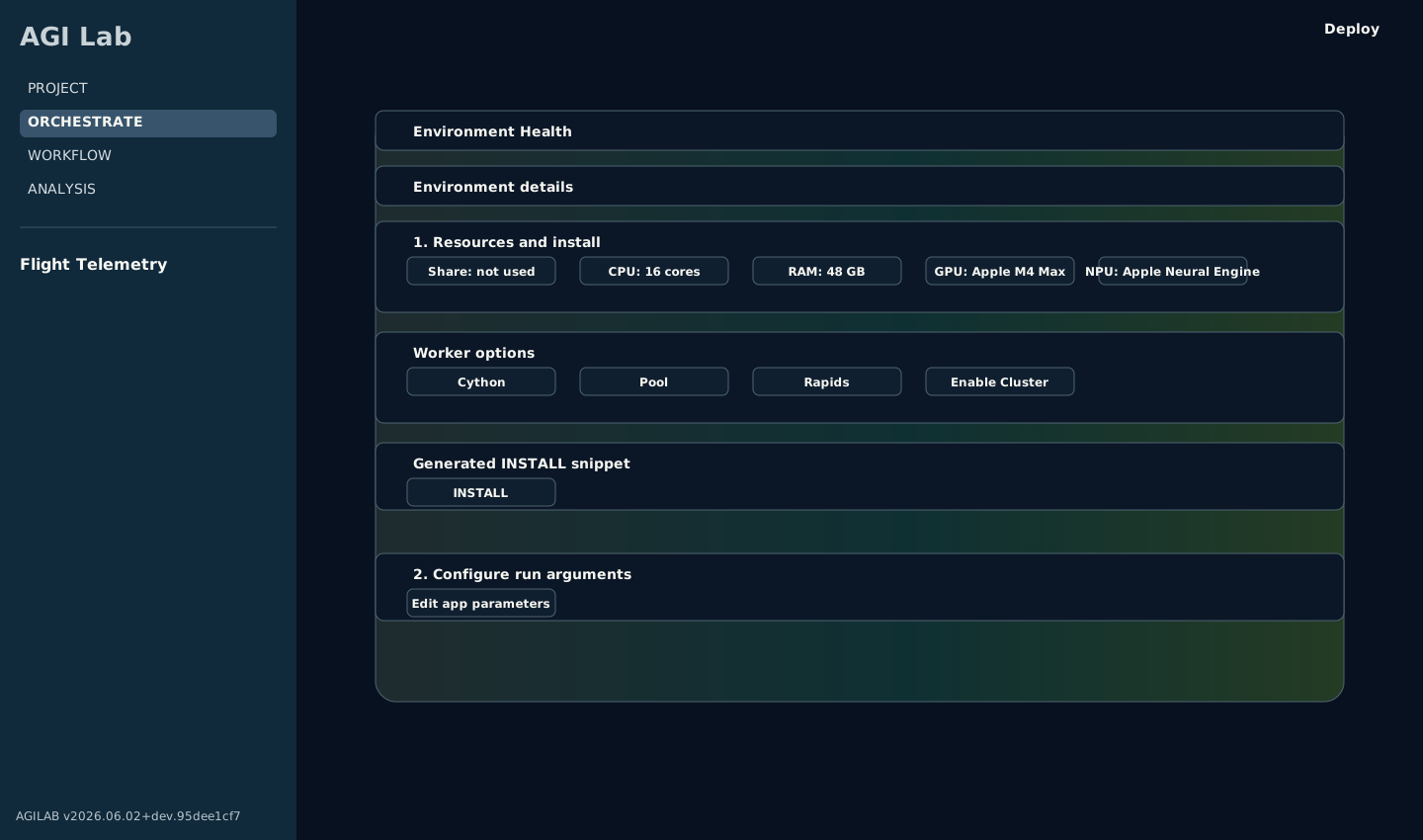
ORCHESTRATE presents the active project’s runtime state and Python-backed controls for resources, deployment, distribution, and execution.
Workspace header and diagnostics
Choose the active project with the React header’s Project selector.
The orchestration controls and generated snippets use that project’s settings.
The page’s verbosity control changes the verbose flag injected into generated
snippets (0–3) and persists it under [cluster].verbose.
Main Content Area
Project runtimeis the compact readiness header at the top of the page. It shows the runtime module, manager/worker environment status, run count, data-share size, and last project change without filling the page with long absolute paths. Use the collapsedRuntime detailsexpander when you need the full project, environment, or data-share path for support or copy/paste.Resources and deploymentgroups the cluster configuration. Toggle support forpool,cythonandrapids, enable the Dask scheduler and provide IP definitions for workers. The calculated mode hint clarifies how the chosen combination will execute and the settings are written back to~/.agilab/apps/<app>/app_settings.toml.Resources and deploymentincludes the snippet that provisions the project’s virtual environments.Deploy scheduler & workersstreams stdout/stderr intoDeployment logsso you know when the worker is ready. A successful install automatically enables theRunsection.Arguments and distribution are grouped into two sections:
Configure run arguments for <module>: edit the run arguments managed inapp_args.py. You can toggle between the generated form UI and the optional custom snippet saved inapp_args_form.py. Saved values update[args]in~/.agilab/apps/<app>/app_settings.toml. Custom forms may also surface derived preview metrics computed from the current inputs and the latest generated summary artefacts. When they do, the preview should match the metric written back by the app afterRUNso the UI and exported reports stay aligned.Preview distribution workplan: generates theAGI.get_distribsnippet and theCHECK DISTRIBUTEaction. When the command succeeds theDistribution treeexpander plots the resulting work plan (DAG or tree) andWorkplanlets you reassign partitions to different workers before saving the modified plan.
Runexposes theAGI.runsnippet together with aBenchmark all modestoggle if you want to iterate through every execution path.RUNstreams logs into theRun logsexpander and stores the output timings inbenchmark.json, which is summarised underBenchmark results.Notebookexports the current ORCHESTRATE recipe as<app>_orchestrate.ipynb. It includes the generatedDeploy scheduler & workers,CHECK distribute, andRUNsnippets that are available for the active configuration. Use it when you want a review, handoff, or no-lock-in copy of the orchestration work that remains useful outside the AGILAB UI. It is export-only: notebook import remains in WORKFLOW because import changeslab_stages.tomland therefore belongs to the pipeline definition workflow.Service mode (persistent workers)keeps long-lived worker loops alive and lets you triggerSTART/STATUS/HEALTH gate/STOPwithout rebuilding the execution context every time.LOAD DATAfetches the latest dataframe path configured for the project and shows an in-place preview. The preview is available even after a rerun.Prepare Data for WORKFLOW and ANALYSIScreates (or updates) the CSV that powers the WORKFLOW and ANALYSIS pages. Use the column selector withSelect allsupport to decide which fields are persisted to${AGILAB_EXPORT_ABS}/<module>/export.csv.
Execution Mode Values
The generated snippets use two closely related parameters that come from
Resources and deployment:
Parameter |
Used by |
Meaning |
|---|---|---|
|
|
Bitmask of the execution capabilities that the install stage should prepare on the target machines. |
|
|
One concrete execution mode selected for this run, built from the same bitmask scheme. |
AGILAB currently builds these values from the execution toggles as follows:
Toggle |
Bit value |
Meaning |
|---|---|---|
|
|
Enable the worker-pool execution path when the app provides it. The backend may be process- or thread-based. |
|
|
Enable the compiled worker path when the worker has a Cython build. |
|
|
Run through the Dask scheduler / distributed worker path instead of a local-only run. |
|
|
Enable the RAPIDS / GPU execution path when the target environment supports it. |
Common examples:
Value |
Expression |
Typical reading |
|---|---|---|
|
none |
Plain local Python execution. |
|
|
Local multiprocessing path. |
|
|
Distributed run without extra pool / Cython / RAPIDS flags. |
|
|
Distributed pool-based run with RAPIDS enabled. |
|
|
All currently enabled execution flags. |
This is why generated snippets should express execution intent with public
constants such as AGI.PYTHON_MODE | AGI.DASK_MODE and pass run settings
through RunRequest. One snippet prepares runtime capabilities through
AGI.install(..., modes_enabled=...); the other selects the concrete run
shape through AGI.run(app_env, request=request).
In normal usage, you do not type bitmasks manually. You set the toggles in
Resources and deployment and AGILAB generates the matching snippet.
From UI to Snippet Fields
If you are reading a generated snippet and want to know where each value came from in the UI, use this mapping:
UI field or toggle |
Generated snippet field |
Notes |
|---|---|---|
|
|
Copied directly into |
|
contributes |
Also enables the scheduler / workers fields in the generated snippet. |
|
|
Host running the Dask scheduler in distributed mode. |
|
|
Maps each host to a worker-slot count. For example,
|
|
contributes |
Enables the worker-pool path when the app supports it. The backend may be process- or thread-based. |
|
contributes |
Enables the compiled worker path when a Cython build exists. |
|
contributes |
Enables the RAPIDS / GPU path when the target environment supports it. |
|
app-specific kwargs such as |
Comes from the generated form or custom |
Distributed Workflow
For distributed runs, ORCHESTRATE is the control point. The intended workflow is:
Configure scheduler, workers, and execution flags in
Resources and deployment.Let ORCHESTRATE generate the current
AGI.install(...),AGI.get_distrib(...), andAGI.run(...)snippets.Reuse the generated run snippet in WORKFLOW when the distributed execution should become a reproducible WORKFLOW stage.
You usually do not write these orchestration snippets manually first. They are generated from the current UI configuration. See Distributed Workers for the full step-by-step deployment guide.
For a first pass through the UI, follow this sequence exactly:
Open
Resources and deploymentand configure the scheduler host and worker map.Run
Deploy scheduler & workersso the worker runtime is staged on the configured machines.Run
CHECK DISTRIBUTEto inspect the generated distribution tree and confirm the work plan matches the selected workers.Open
Runand copy or export the generatedAGI.runsnippet.Optionally open
Notebookto download the current orchestration recipe as a runnableagi-corenotebook for review, handoff, or reuse if the AGILAB UI or distributed runtime is no longer the interface you want to keep. This keeps execution on the stable core runtime.In WORKFLOW, import or regenerate that snippet as a WORKFLOW stage instead of retyping it.
Snippet Handoff to WORKFLOW
For newcomers, keep ORCHESTRATE and WORKFLOW in sync with this workflow:
Generate the snippet in Orchestrate (typically
AGI.run).On WORKFLOW, open Add stage (or New stage when starting fresh), pick
Stage source = Generate stagefor a fresh generation, orStage source =an existing snippet (for exampleAGI_run.pyorlab_snippet.py) to import it directly.For app updates, update
<module> argsin the per-user workspaceapp_settings.toml/[args]then regenerate or re-import the matching snippet in WORKFLOW.
This avoids running stale code that still references old app argument values. For example, when an app renames an argument, older saved snippets that still pass the removed name will fail fast until you regenerate or replace them.
Service Mode Health
For a complete operator workflow (web and CLI), see Service Mode.
Use these defaults as a stable baseline for most projects:
Heartbeat timeout:10s.Done artifacts TTL:168h(7 days).Failed artifacts TTL:336h(14 days).Heartbeat artifacts TTL:24h.Done/Failed max files:2000each.Heartbeat max files:1000.
Health gate defaults are persisted per app in the workspace
app_settings.toml under [cluster.service_health]:
allow_idle(defaultfalse).max_unhealthy(default0).max_restart_rate(default0.25).
When STATUS runs, Orchestrate displays a health table:
worker: Dask worker address.healthy: overall health evaluation for that worker loop.reason: why the worker is unhealthy (empty when healthy).future_state: Dask future state for the loop task.heartbeat_state: latest worker heartbeat-reported state.heartbeat_age_sec: seconds since latest heartbeat.
Use HEALTH gate to run AGI.serve(..., action="health") and immediately
validate the current state against the per-app SLA thresholds above.
Auto-restart reason values currently include:
loop-finished/loop-error/loop-cancelled.missing-heartbeat.stale-heartbeat(<N>s).
Service health JSON export
Each AGI.serve service action writes a machine-readable health snapshot
(agi.service.health.v1), and action="health" returns that payload
directly.
Default output path:
${AGI_CLUSTER_SHARE}/service/<app_target>/health.json.
Custom output path:
health = await AGI.serve(
    app_env,
    action="health",
    health_output_path="service/custom_health.json",
)
print(health["status"], health["workers_unhealthy_count"])
Field reference:
Troubleshooting and checks
Use these checks if Orchestrate actions do not behave as expected:
If
Deploy scheduler & workersstays stuck, check cluster host reachability, SSH credentials, and whether~/.agilab/.envstill points to valid venv paths.If the generated snippet looks wrong, compare
[args]in~/.agilab/apps/<project>/app_settings.tomlwith the values shown inapp_args_form.py. If the workspace copy is missing, AGILab will reseed it from the app source copy (<project>/app_settings.tomlorsrc/<project>/src/app_settings.toml).If
RUNreturns import errors, verify the target virtual environment contains the same versions assrc/<project>/pyproject.tomland re-run install.If no logs appear, confirm the log expansion is expanded and that the runtime has write access to
~/log/execute/<app>.If an external monitor cannot read service health, call
AGI.serve(..., action="health")and verify thathealth.jsonis written at the expected path.