Architecture in 5 minutes
AGILAB is an anti-lock-in reproducibility workbench for AI/ML engineering
teams. It bridges local interactive development, distributed execution, and
result analysis while preserving an exit path: workflows can be exported back
to runnable agi-core notebooks if the AGILAB UI or distributed runtime is
no longer the right interface for a project. That export keeps execution on the
stable, production-grade core technology while preserving the project and stage
contract. The stable core runtime remains the smallest supported handoff surface.
Use this page for the mental model before opening the detailed architecture reference. The global map shows the current level of abstraction: AGILAB is not one monolithic runtime, but a project contract that can move between UI, notebooks, CLI scripts, local runs, cluster runs, analysis, and notebook export.
Read the architecture as three simple rules:
one app project contract is reused across UI, CLI, notebooks, package mode, and export
two runtimes stay separate: the manager prepares and dispatches work; workers execute packaged stage code
one public control path stays visible from first proof to evidence:
AgiEnv -> AGI.run -> worker package -> artifacts
Global architecture map
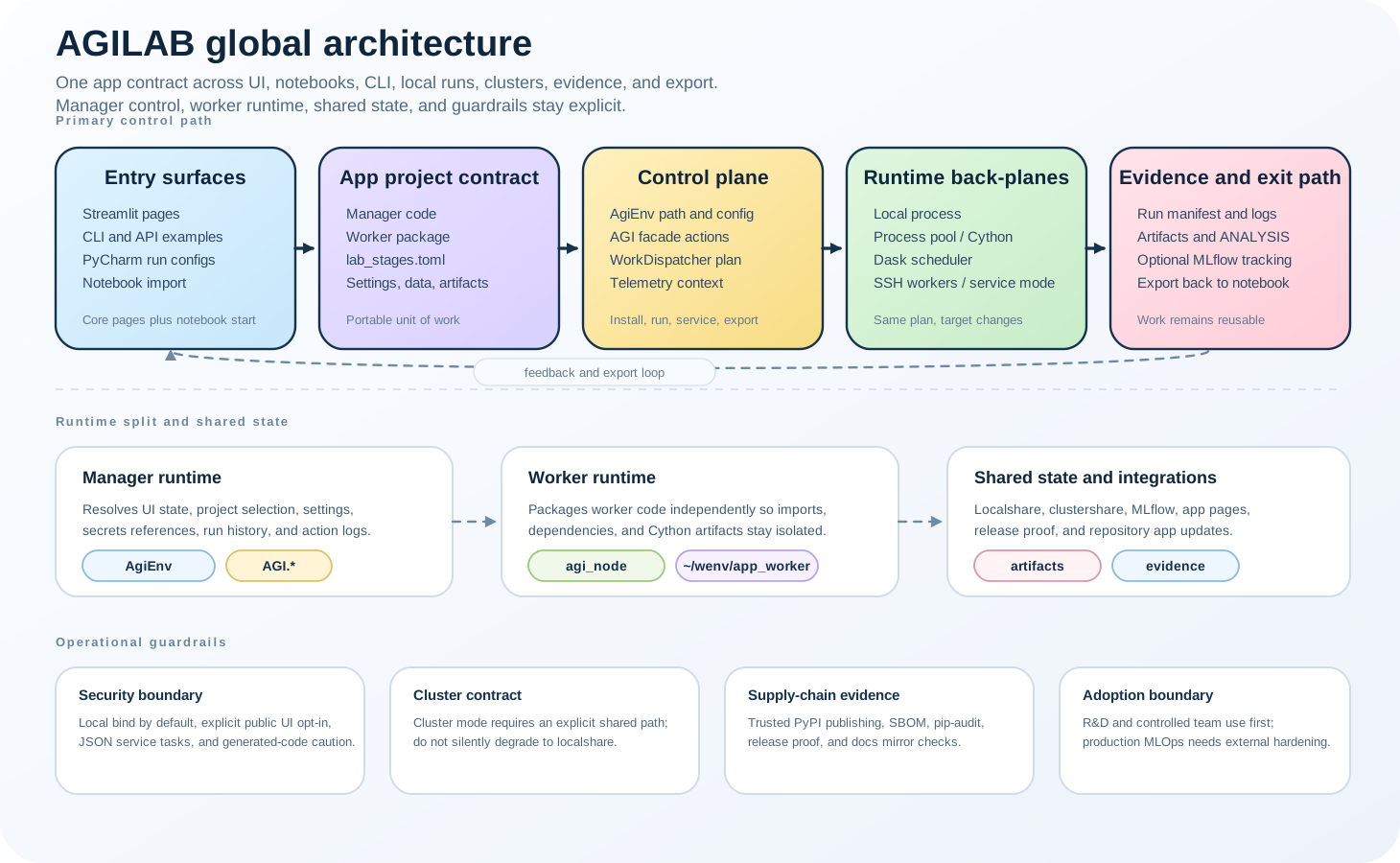
The same app project contract connects native React UI pages, notebooks, CLI/API entry points, local execution, distributed execution, evidence, and the notebook export exit path.
One control path
User
  |
  v
native React UI, CLI wrappers, or notebook entry points
  |
  v
AgiEnv: settings, project selection, app paths, logs, local workspace
  |
  v
AGI facade: install, get_distrib, run, service actions
  |
  v
agi-node / agi-cluster: package workers, dispatch work, start local or SSH workers
  |
  v
Dask back-plane and optional MLflow tracking
  |
  v
Artifacts, run manifests, app pages, and ANALYSIS views
The important point is not the transport. A local run, a Dask run, and an SSH cluster run all keep the same high-level shape. Distributed execution adds scheduler, worker, and share configuration, but it does not change the app contract.
What each layer owns
Layer |
Responsibility |
Proof to look for |
|---|---|---|
UI / CLI / notebook |
Capture user intent and keep PROJECT, ORCHESTRATE, WORKFLOW, and ANALYSIS on one visible path. |
|
|
Resolve app paths, settings, logs, environment variables, and per-user workspace files. |
|
|
Provide the public install, distribution, execution, and service actions used by both UI and examples. |
Example scripts in |
worker packaging |
Build and stage worker runtimes so manager code and worker code stay isolated. |
Worker copies under |
Dask / MLflow |
Dask is the worker dispatch back-plane; MLflow is an optional tracking system AGILAB can integrate with, not replace. |
Dask logs, MLflow runs, artifacts, and ANALYSIS pages. |
Manager versus worker
The manager side is where AGILAB reads settings, validates form arguments,
chooses datasets, prepares a RunRequest, and calls AGI.run. The worker
side is where app-specific stage code runs after it has been packaged into a
worker environment.
This split also explains dependencies:
manager dependencies belong in the app project
pyproject.tomlworker dependencies belong in
src/<app>_worker/pyproject.tomlUI-only dependencies such as native React UI should stay out of worker manifests
If a run fails only after worker deployment, inspect the worker manifest and
~/wenv/<app>_worker copy before changing the manager code.
Boundary
AGILAB does not replace MLflow, Kubeflow, cloud deployment platforms, security gateways, or production rollback systems. It keeps the engineering experiment path reproducible and visible, then exports evidence and artifacts that those deployment-focused systems can consume.
Next pages
Quick-Start for the first proof.
AGILab Architecture for package and runtime details.
AGILab in the MLOps Toolchain for the MLOps boundary.
Compatibility Matrix for validated and documented public routes.