Agent Workflows
This page is for developers and contributors working inside the AGILAB repository. It is not the newcomer path.
If you are new to AGILAB, stay on Quick-Start first. Use this page only when you intentionally want a CLI coding-agent workflow against the repository itself.
What “repo-ready” means
The repository already ships the configuration, wrappers, and conventions needed to work with these executable agent paths against the same repo contract:
Codex
Claude
Aider
OpenCode
Mistral Vibe
Tokki
That does not mean the six tools behave identically. It means the repo now contains a prepared entry path for each of them instead of relying on ad hoc local setup.
Continue can consume the same public catalog through AGENT_SKILLS.md and
llms.txt, but AGILAB does not ship a Continue wrapper or project config yet.
Agents and external tools can also consume agilab-capabilities.json from
the repository root when they need a machine-readable inventory of shipped
commands, pages, apps, packages, schemas, and catalog files. The paired
agilab-capabilities.schema.json file defines the manifest shape, and
python3 tools/agilab_capabilities_lint.py --check validates the schema
contract plus cross-object discovery rules. The semantic rule metadata is
declared in agilab-capability-rules.yml so categories, severities, and
rationales are inspectable by humans and agents.
The generated agenticweb.md file is the compact agentic-web front door for
external discovery. It is generated from the capability manifest with
python3 tools/agenticweb_manifest.py --apply and checked with
python3 tools/agenticweb_manifest.py --check.
Root agent instructions are checked as their own contract:
python3 tools/agent_instruction_contract.py --check
The output uses schema agilab.agent_instruction_contract.v1 and verifies
that AGENTS.md, AGENT_CONVENTIONS.md, AGENT_LEARNINGS.md,
tools/agent_workflows.md, this public page, agilab-capabilities.json,
and agenticweb.md still describe the same executable agent-facing contract.
The report also includes a deterministic file evidence snapshot with line
counts, heading counts, required marker coverage, and SHA-256 hashes for the
checked runbook files. This guards the runbook and discovery layer only; it does
not execute agents, generate instructions with an LLM, or replace skill quality,
security, or
capability-manifest checks.
Agent commit provenance is checked separately:
python3 tools/agent_commit_provenance_guard.py --check-config
python3 tools/agent_commit_provenance_guard.py --inventory-github --repo ThalesGroup/agilab --json
The output uses schema agilab.agent_commit_provenance.v1. On
agent-prefixed branches such as codex/*, codex-*, claude/*,
aider/*, opencode/*, and agent/*, the guard rejects human Git
author or committer display names and requires explicit agent or bot names.
Those names may use the confirmed operator’s verified email and matching
signing key. Do not invent a bot noreply address: it may belong to another
GitHub account. The offline guard checks attribution conventions; verify email
ownership and new commit signatures separately on GitHub. The config check
reads effective identities, including author/committer config and environment
overrides.
The repo hooks run the config check before commits and the pushed-commit check
before pushes, so agent-authored PRs cannot silently appear as human-authored
work.
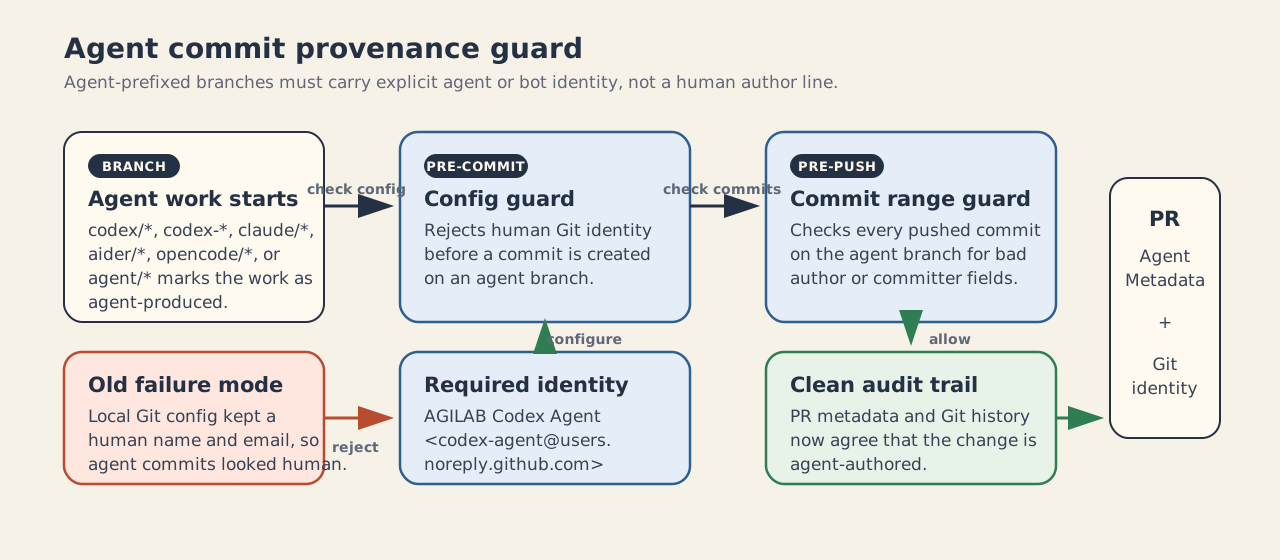
Agent-prefixed branches preserve explicit agent display names while the confirmed operator owns the signing account.
PR Agent Metadata records the confirmed operator/approver separately from the
agent and its technical settings. In Jean-Pierre MORARD’s confirmed sessions,
the operator is jpmorard; verify the publishing GitHub actor. Other operators
must supply their own identity. For unavailable model/runtime details, write
not exposed by the runtime. A person’s name does not fill those fields.
Context routing
When the task is ambiguous, route the prompt and changed files through the local context router before loading a large skill set:
python3 tools/agent_context_router.py \
  --files docs/source/agent-workflows.rst src/agilab/agent_run.py \
  --prompt "update agent evidence docs" \
  --json
The output uses schema agilab.agent_context_recommendation.v1. It lists the
baseline runbooks, matched rules, and recommended repo-managed skills from
agent-context-rules.json. This is a contract proof for context selection
only: it does not execute agents, run tests, or replace
tools/impact_validate.py.
For a scoped AGILAB context pack that starts from the current project and framework files,
pass --profile agilab:
python3 tools/agent_context_router.py \
  --profile agilab \
  --files docs/source/agent-workflows.rst src/agilab/agent_run.py \
  --prompt "update agent evidence docs" \
  --json
For a smaller local wrapper that expects the bounded token-saving profile,
pass --profile tokki:
python3 tools/agent_context_router.py \
  --profile tokki \
  --files src/agilab/pages/4_ANALYSIS.py src/agilab/notebooks/notebook_export_support.py \
  --prompt "fix notebook sync in the analysis page" \
  --json
The context_profile block returns bounded baseline files, matched context
packs, estimated token budget, and follow-up validation commands. The profile
narrows context selection only; AGILAB validation remains anchored in
tools/impact_validate.py, ./dev, and workflow-parity profiles.
Validate the rules with:
python3 tools/agent_context_router.py --check
Demo an agentic workflow
For a live demo, run the provider-neutral helper from the repository root:
tools/demo_agentic_agilab_workflow.sh --agent codex
The demo is local-first. It does not need to call a hosted LLM to prove the
workflow. It shows an agentic coding use case where an agent captures the repo
scope, routes the task through AGILAB’s context router, computes the
impact-validation plan, records the validation as an agilab.agent_run.v1
evidence manifest, then renders handoff, next-action, validation, and context
cards that another agent can consume.
Use a custom prompt or another agent label when presenting another path:
tools/demo_agentic_agilab_workflow.sh \
   --agent claude \
   --prompt "review the current app changes and route the proof"
Generated evidence is written under
artifacts/demo_media/agentic-workflow/evidence/, which is ignored by Git.
The command uses staged, unstaged, and untracked working-tree changes when
there are local changes; if the tree is clean, it falls back to the diff
against origin/main for impact validation and uses the agent workflow docs
as the context-routing example.
Agent run evidence
Use agilab agent-run when a coding-agent action should leave AGILAB
evidence instead of only a tool-specific log:
agilab agent-run --agent codex --permission-level standard --label "Review current diff" --tag review --metadata branch=main -- codex review
The command writes a redacted agilab.agent_run.v1 manifest, local
stdout.txt / stderr.txt artifacts, and an append-only
agilab.agent_trace.v1 event log under
~/log/agents/<agent>/<run-id>/. Environment override values passed with
--env KEY=VALUE are redacted from the manifest. Command arguments are
redacted by default and represented by an argv hash; pass
--include-command-args only when the prompt/arguments are safe to store.
The stdout/stderr files stay local artifacts so tool output is not embedded in
public JSON by default. Those output artifacts redact obvious secret
assignments, supported secret refs, and common standalone API-token patterns by
default. Pass --include-raw-output only for safe local diagnostics.
Use --tag and --metadata KEY=VALUE for structured, non-secret context
that other tools can query later. Read previous run evidence from the CLI:
agilab agent-run list --agent codex --json
agilab agent-run list --tag review --metadata branch=main --protocol-adapter mcp --capability evidence-review --json
agilab agent-run handoff ~/log/agents/codex/<run-id>
agilab agent-run next ~/log/agents/codex/<run-id> --json
agilab agent-run context --tag review --metadata branch=main --limit 5 --json
agilab agent-run lineage <run-id> --json
agilab agent-run compare ~/log/agents/codex/<failed-run> ~/log/agents/codex/<follow-up-run> --json
agilab agent-run validate ~/log/agents/codex/<run-id> --json
or from Python:
from agilab.agent_run import list_agent_runs

runs = list_agent_runs(agent="codex", limit=5)
Agent evidence contract
AGILAB keeps the agent evidence layer deliberately small and provider-neutral:
agent_run_manifest.jsonrecords command identity, redacted arguments, environment metadata, metadata-only protocol labels, provider/model capability metadata when configured, and pointers to local artifacts.agent_trace_meta.jsondescribes the trace directory.agent_events.ndjsonis an append-only typed event stream. Current event types includesession_start,command_start,tool_start,tool_output,tool_done,permission_request,permission_resolved,compact,rewind, andsession_end.tool-output/is reserved for large or structured tool payloads that should stay out of public JSON.The read side can produce redacted continuation cards, deterministic next-action cards, filtered context packs, follow-up lineage graphs, and pairwise run comparisons. Validation checks manifest structure, trace sequence, terminal status/return-code consistency, and recorded stdout/stderr and ownership-claim hashes and sizes. A late runner publication failure keeps the command’s earlier outcome separate from the final infrastructure failure. Inspect
content_integrity.statusseparately from the command outcome: legacy records without hashes remain readable withunverifiedintegrity. Matching recorded bytes does not establish producer authenticity, exact executed source, or task quality. These surfaces do not embed stdout/stderr contents.
The base package records protocol bridges as evidence labels only. Add
--protocol-adapter mcp or --capability app-as-tool when experimenting
with agent protocol bridges without adding protocol-stack dependencies to the
base runtime.
The tool safety helpers expose the same control points for agent commands and future agent tools:
permission tiers:
readonly,safe,standard, andoperator; actual command execution is astandardaction, while destructive executable names and obvious destructive shell, Python, Git, Docker, Kubernetes, or package-manager command content are operator-gateddeterministic confirmation tokens for operator-gated/destructive actions
before/after hooks that can approve, deny, redact, audit, or replace a tool result before it is written back into evidence
The permission layer is an evidence and operator-confirmation guard. It is not a process sandbox; use OS/container isolation for untrusted commands.
Agent configuration is layered from ~/.agilab/agents/agents.json and then
.agilab/agents.json files from the project root to the current working
directory. A minimal project-local file can stamp provider capability and
permission context into future agent-run manifests:
{
  "default": {"provider": "local-code"},
  "permission": {"level": "standard"},
  "providers": {
    "local-code": {
      "type": "ollama",
      "model": "qwen2.5-coder:latest",
      "capability": {"context_window": 32768}
    }
  }
}
Use explicit CLI overrides when a run should carry a one-off provider or model label without changing project config:
agilab agent-run --provider openai --model gpt-5 --permission-level standard -- codex review
Supported agent paths
Codex and Claude
Repo-managed skills live under
.codex/skillsand.claude/skills.AGENTS.mdremains the source of truth for repo policy, validation, and launch rules.
Aider
Use the wrapper from the repository root:
./tools/aider_workflow.sh chat
For a one-off task:
./tools/aider_workflow.sh exec "Refactor only ... keeping behavior unchanged"
What the repo already provides:
.aider.conf.ymlfor repo-local defaultstools/aider_workflow.shfor the standard entry pathtools/aider_workflow.mdfor usage details
Default local model path:
qwen-local->ollama_chat/qwen2.5-coder:latest
Additional local aliases:
gpt-oss-local->ollama_chat/gpt-oss:20bqwen3-local->ollama_chat/qwen3:30b-a3b-instruct-2507-q4_K_Mqwen3-coder-local->ollama_chat/qwen3-coder:30b-a3b-q4_K_Mdevstral-local->ollama_chat/devstral:latestministral-local->ollama_chat/ministral-3:14b-instruct-2512-q4_K_Mphi4-mini-local->ollama_chat/phi4-mini:3.8b-q4_K_M
OpenCode
Use the wrapper from the repository root:
./tools/opencode_workflow.sh chat
For a one-off task:
./tools/opencode_workflow.sh exec "Add a regression test for ..."
What the repo already provides:
opencode.jsonfor project configuration.opencode/agents/for project-scoped agentstools/opencode_workflow.shfor the standard entry pathtools/opencode_workflow.mdfor usage details
Default local model path:
ollama/qwen2.5-coder:latest
Useful efficient local overrides include ollama/gpt-oss:20b,
ollama/qwen3-coder:30b-a3b-q4_K_M,
ollama/qwen3:30b-a3b-instruct-2507-q4_K_M,
ollama/devstral:latest,
ollama/ministral-3:14b-instruct-2512-q4_K_M, and
ollama/phi4-mini:3.8b-q4_K_M.
Mistral Vibe
Use the wrapper from the repository root:
./tools/vibe_workflow.sh chat
For a one-off task:
./tools/vibe_workflow.sh exec "Refactor only ... keeping behavior unchanged"
What the repo already provides:
tools/vibe_workflow.shfor the standard entry pathtools/vibe_workflow.mdfor usage details
Vibe provider and model selection stays in Vibe’s own configuration. For local
Devstral, serve the model behind an OpenAI-compatible endpoint and select the
corresponding Vibe model alias. AGILAB’s installer can separately prepare the
Ollama devstral:latest family for WORKFLOW with
./install.sh --install-local-models devstral.
Local model prerequisite
Aider and OpenCode in this repo are prepared for local Ollama-backed models. Mistral Vibe can use its own local OpenAI-compatible provider configuration. In practice this means:
keep a local Ollama server running
use the repo defaults or override them with the documented environment variables
The prepared local families are the same ones already documented elsewhere in
AGILAB: gpt-oss, qwen, deepseek, qwen3, qwen3-coder,
devstral, ministral, and phi4-mini. If a model is served through
vLLM or another OpenAI-compatible gateway instead of Ollama, configure the
AGILAB assistant with AGILAB_LLM_BASE_URL and AGILAB_LLM_MODEL.
Bounded evidence for agent clients
agent_handoff includes the latest 20 trace messages, bounded by encoded size,
with total and omitted event counts. Use the read-only read_agent_trace MCP
tool for earlier details: supply manifest_path, then follow next_cursor.
Pages default to 50 events and 32 KiB of JSON, with configurable limits of 100
events and 64 KiB. Oversized events are marked as truncated. An incomplete crash
tail stops pagination and supplies a resume_cursor for a later read; it is
not an endless next page. Records larger than 1 MiB are rejected explicitly.
list_agent_runs supports offset and next_offset with stable timestamp
and path ordering; the inventory can change between requests.
Real command output is captured incrementally. Each stdout/stderr artifact holds
at most 8 MiB of complete redacted lines; lines exceeding 64 KiB are omitted.
output_capture records observed/stored bytes, oversized lines and incomplete
streams. Tokens split across read chunks and multiline Bearer credentials retain
redaction. A failed capture or a timeout with open inherited pipes cannot count
as successful evidence. Cancellation signals only the process/group launched by
the active capture; Windows cleanup covers the direct child. Detached descendants
and external side effects are outside this lifetime guarantee.
The MCP stdio server negotiates supported protocol versions per connection.
Clients using 2025-06-18 or 2025-11-25 receive structuredContent and output
schemas alongside compatible text content. Older clients retain text results.
Input schemas are checked before execution; malformed parameters, tool failures
and evidence-integrity failures remain distinct. Error text is redacted and
bounded. Read-only annotations describe behavior; configured read roots remain
the access boundary. The server does not advertise experimental MCP Tasks.
Frozen experiments and independent acceptance
The packaged pilot compares a baseline that treats missing measurements as zero with a candidate that excludes them. Both commands exit successfully; a separate grader accepts only the correct result. Run it without a model service or apps workspace:
uv --preview-features extra-build-dependencies run python -m agilab.agent_runtime.experiment_demo --output /tmp/agilab-agent-pilot
uv --preview-features extra-build-dependencies run python -m agilab.agent_runtime.experiment verify /tmp/agilab-agent-pilot/candidate attempts/pilot/receipt.json
Use a new output directory. comparison.json retains both attempts and their
acceptance outcomes. Unobserved model usage stays null. The comparison API can
observe a single complete terminal Codex usage report from a registered output
artifact; malformed, repeated or incomplete reports remain unmeasured. Missing
cache breakdowns stay unknown. These are local provider reports, not billing
attestation, and this deterministic pilot is not a model-quality benchmark.
For your own trusted Python experiment, use python -m
agilab.agent_runtime.experiment prepare --help to select source and input files,
a separate grader, declared outputs and acceptance check identifiers. Preparation
freezes the selected bytes in snapshot/ and seals plan.json. Execution
rejects changed original inputs, copies the snapshot, records the interpreter and
actual command, and launches the grader from a separate frozen copy. Run with
run <root> --attempt-id <id>; --resume reuses only matching completed
checkpoints. An ambiguous native command claim cannot be replayed under that id.
Each attempt retains native command evidence, launch and grader-input checkpoints,
output hashes and an agilab.agent_experiment_receipt.v1 receipt. Verification
checks content and execution binding independently of whether acceptance passed.
Failed evaluations can have valid receipts. Complete bundles can move on the same
operating system; cross-OS path translation is not supported. Original source
availability is reported separately from retained receipt verification.
This local executor runs trusted code with the operator’s permissions. It does not sandbox code, isolate networking, freeze installed dependencies or attest producer identity. Selected source/input snapshots may contain private data and stay in the operator’s local evidence store.
Durable selected experiment tasks
Use the local task store when an agent experiment needs persistent approval,
background execution or interruption recovery. First prepare an experiment under
<store>/experiments/<name> with the preparation command above. Register that
relative directory and submit a stable request key:
uv --preview-features extra-build-dependencies run python -m agilab.agent_runtime.tasks register /tmp/agilab-tasks demo experiments/demo
uv --preview-features extra-build-dependencies run python -m agilab.agent_runtime.tasks submit /tmp/agilab-tasks demo request-1
Registration fixes the selected plan digest. Submission returns a task id,
attempt number and awaiting_approval status. Reusing that request key returns
the same task; using it for another action fails. Review the registered plan and
record the exact digest and observed attempt with the local operator CLI:
uv --preview-features extra-build-dependencies run python -m agilab.agent_runtime.tasks approve /tmp/agilab-tasks <task-id> --plan-sha256 <digest> --attempt 1
uv --preview-features extra-build-dependencies run python -m agilab.agent_runtime.tasks start /tmp/agilab-tasks <task-id> --attempt 1
uv --preview-features extra-build-dependencies run python -m agilab.agent_runtime.tasks status /tmp/agilab-tasks <task-id>
deny uses the same digest and attempt arguments. cancel also requires
--attempt and persists cancellation intent. A live worker stops only its own
command; cancellation is terminal only with observed direct-command termination
or before execution starts. Detached descendants and external side effects remain
outside this guarantee. A dead worker’s released lease alone cannot prove its
child stopped; such cases remain interrupted with termination unverified.
reconcile <store> <task-id> verifies a retained receipt after worker death
without executing code. If evidence is incomplete, inspect the command’s side
effects before using resume ... --attempt <n> or retry ... --attempt <n>.
Resume reuses only matching checkpoints and respects permanent native claims.
Retry retains old evidence, creates a new attempt and requires new local approval.
Old approval, start and cancellation requests cannot affect that new attempt.
No exactly-once guarantee is made for arbitrary external side effects.
Task states are immutable versioned JSON under tasks/<id>/states/; approval,
request binding and receipt references survive server restarts. Kernel locks
serialize state publication and active workers without deleting lock files or
using remembered PIDs to take over another process. Stores are bounded to 32
attempts and 512 revisions per task and require local filesystems supporting
advisory locks and atomic hard-link publication. The store is operator-owned;
its hashes and approval records do not authenticate the operator.
MCP remains read-only by default. To explicitly enable selected tasks, launch:
agilab-mcp serve --task-root /tmp/agilab-tasks
agent_quickstart remains read-only and describes both evidence and task
boundaries. The per-connection adapter adds list_task_actions,
submit_agent_task, read_agent_task, start_agent_task and
cancel_agent_task. Start/cancel require the observed attempt. The adapter
accepts registered action ids, not paths, commands or new arguments; approval,
registration, resume and retry remain local operator actions. Prepared trusted
Python still runs with operator permissions and can access external resources.
This adapter does not implement or advertise the experimental MCP Tasks protocol.
Where to read the repo-local files
The public docs page gives the high-level entry points. The operational details stay in the repository itself:
When not to use this page
If you are doing your first real AGILAB run, use Quick-Start.
If you want the notebook-first runtime path, use agi-core Demo.
If you want a public demo route instead of repo work, use Demos.